





How can I test my touch screen?
2026/05/22
Share:

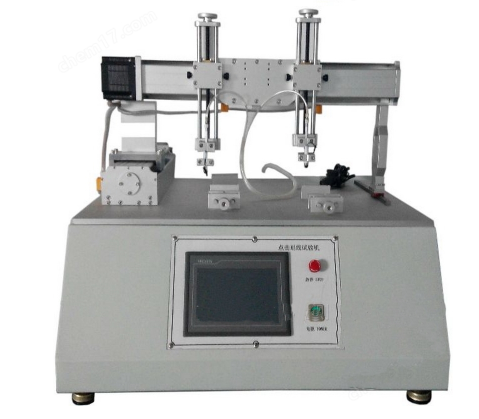
Functions and Applications of Touch Screen Tap-and-Scratch Durability Tester
The Touch Screen Tap-and-Scratch Durability Tester is an automated testing device that evaluates durability, scratch resistance, and touch stability of touch screens by simulating repeated finger or stylus operations such as tapping, drawing lines, and friction movements.
Core Functions
The device uses a stepper motor–driven weighted test head (such as a rubber stylus or capacitive pen) to perform high-repetition testing—up to tens of millions of cycles—under preset conditions of pressure (commonly 250 gf), speed, and movement trajectories (e.g., linear, square, triangle patterns).
It enables controlled and repeatable tapping and scratching actions to simulate real-world usage scenarios.
Main Applications
It is widely used to evaluate the consistency of touch response, scratch resistance, and interlayer bonding reliability of touch panels in smartphones, tablets, in-vehicle displays, and industrial control screens.
The equipment is suitable for R&D validation, quality control sampling, and compliance testing with industry standards.
Extended Capabilities
Some models support interchangeable test heads such as HB pencils, allowing additional applications like surface hardness testing or coating adhesion evaluation.
The system typically includes coordinate positioning, power-off memory, trajectory storage, and real-time counting functions, with positioning accuracy up to ±0.05 mm.
Typical Output
The tester determines the critical cycle count at which failures occur, such as dead pixels, cracking, capacitive drift, or response delay.
It also generates durability curves to support reliability analysis and product optimization.
Applicable Industries of Touch Screen Tap-and-Scratch Durability Tester
The Touch Screen Tap-and-Scratch Durability Tester is widely used in the following industries:
1. Consumer Electronics Manufacturing
Used for R&D and mass production quality inspection of touch-enabled terminal products such as smartphones, tablets, and smartwatches, ensuring durability and long-term touch performance stability.
2. Automotive Electronics
Applied in reliability and scratch resistance testing of in-vehicle center control screens, instrument clusters, and other automotive touch interfaces under long-term and high-frequency usage conditions.
3. Industrial Control and HMI Systems
Evaluates the reliability of industrial touch panels and human–machine interfaces (HMI) operating in harsh environments and under frequent operational demands.
4. Display Panel and Touch Module Manufacturers
Used by glass cover manufacturers, sensor producers, and touch module suppliers for incoming material inspection and finished product durability testing.
5. Third-Party Testing and Certification Laboratories
Conducts compliance testing for touch screen lifetime, scratch resistance, and impact resistance according to standards such as IEC, MIL-STD, and GB.
6. Maintenance and Used Equipment Evaluation (Less Common)
Occasionally used to assess the residual value and reliability of touch screens in high-end or specialized equipment during repair or second-hand evaluation.
Technical Features of Touch Screen Tap-and-Scratch Durability Tester
The core technical features of the Touch Screen Tap-and-Scratch Durability Tester focus on high-precision motion simulation, programmable trajectories, stable force control, and automated data acquisition. It is specifically designed to evaluate the click and scratch durability of touch screens.
1. High-Precision Motion Control
The system adopts stepper motors or servo motors combined with linear guides and ball screw drives to form a three-axis XYZ motion system. Positioning accuracy reaches 0.01–0.05 mm, ensuring high repeatability of tapping and scratching positions.
It supports multiple motion paths such as linear, triangle, rectangular, and arc trajectories. Some models also support “teaching mode” coordinate learning or CAD file import for path programming.
2. Adjustable Constant Force Loading
Test force typically ranges from 80–1500 gf (approximately 0.8–15 N). Force is precisely controlled using weight-based loading or pneumatic cylinders (e.g., SMC systems), simulating different levels of finger or stylus pressure.
Some models support real-time force feedback for enhanced accuracy.
3. Wide Range of Speed and Cycle Control
Clicking speed: 10–180 cycles/min
Scratch speed: 50–4500 mm/min (or 0–200 mm/s)
Test cycles: 1–99.999.999 cycles
The system features power-off memory, automatic stop upon completion, and audible/visual alarm functions.
4. Multi-Station and Multi-Function Design
Common configurations include 1–4 test stations, which can operate independently or simultaneously for tapping, scratching, and optional rolling tests.
By replacing test heads, the system can also be used for coating hardness or adhesion testing of housings and surfaces.
5. Intelligent Control and Data Recording
Most systems use PLC + touch screen interfaces or PC-based software control. They collect real-time data such as response time, impedance variation, and coordinate deviation.
The system automatically generates test reports and analysis curves, such as force–displacement and scratch depth profiles. High-end models support Android or WiFi data transmission.
6. Structural Stability Design
The frame is typically made of anodized aluminum or alloy steel, ensuring rigidity and vibration resistance.
The working platform size usually ranges from 600 × 300 mm to 800 × 400 mm, suitable for testing smartphones, tablets, in-vehicle displays, and medical touch screens up to 10.2 inches.
Operating Procedure of Touch Screen Tap-and-Scratch Durability Tester
The standard operating procedure for the Touch Screen Tap-and-Scratch Durability Tester is as follows:
1. Specimen Preparation and Installation
Place the test sample (clean, flat, and dust-free touch screen) onto the test platform and secure it firmly to prevent any displacement.
Select the appropriate test head according to the test type (tapping or scratching), such as a rubber stylus or HB pencil, and install it onto the Z-axis actuator.
2. Equipment Calibration and Parameter Setting
Connect the device to a 220V power supply, and set test parameters via the touchscreen or computer control interface, including:
Load force (e.g., 100 g, 250 g, 500 g, adjustable via weights or pneumatic pressure)
Tapping speed (typically 0–120 cycles/min)
Scratch speed and trajectory (linear, triangle, rectangle, etc.)
Test cycles (programmable from 1 to 99.999.999 cycles)
Calibrate the X/Y/Z axis zero positions to ensure the test head contacts the screen vertically without tilt.
3. Dry Run and Position Verification
In “manual mode,” move the platform and gently lower the test head to the target test area (e.g., center of the screen).
Confirm that the trajectory fully covers the effective touch area and does not exceed screen boundaries. Save coordinate paths if necessary.
4. Start Test
Switch to “automatic mode” and start the test.
During operation, continuously monitor system status for abnormalities such as noise, deviation, or alarms. The test may be paused at intervals (e.g., every 100.000 cycles) to check screen function and surface condition, including touch response, scratches, or cracks.
5. Completion and Evaluation
Once the preset number of cycles is reached, the system automatically stops. After power-off, remove the specimen.
Evaluate durability according to standards such as:
Functional failure (touch response abnormality)
Surface defects (indentation, scratches, cracking)
ITO layer failure or polarizer deformation
Record results and generate a test report if supported by the system.
6. Cleaning and Maintenance
Clean the test head and platform, and switch off the power supply.
Perform regular maintenance on linear guides and pneumatic components (if equipped) with lubrication as required.
Important Notes
Different brands may have variations in the control interface; always refer to the supplied user manual.
Test force, speed, and cycle settings must follow product specifications or relevant standards (e.g., internal QC standards, GB/T, or industry norms) and should not be arbitrarily changed.
Safety precautions: Do not place hands inside the test area during operation; ensure proper grounding; maintain stable air pressure for pneumatic systems; avoid overloading weight stacks in weight-based systems.
Maintenance and Care
The worktable is typically made of non-fragile adhesive material. After each use, remove adhesive residue thoroughly. Do not clean with hard tools or organic solvents. Instead, use adhesive tape or WD-40 to dissolve and remove residue, maintaining a clean and smooth surface and preventing coating damage or oxidation.
When using weights, do not stack more than three layers to avoid excessive swing that may affect accuracy. Most internal motion components use permanent lubrication and generally require no additional maintenance.
Importance of Touch Screen Tap-and-Scratch Durability Tester
The core importance of the Touch Screen Tap-and-Scratch Durability Tester lies in its ability to quantitatively evaluate the mechanical durability and interaction reliability of touch screens under real-world usage conditions. This directly affects product lifespan, user experience, and market compliance.
1. Simulation of Real-World Wear
Through automated repetitive tapping (Tap) and scratching (Scratch) tests, the equipment replicates daily usage scenarios such as finger pressing, accidental touches, and scratches caused by keys or sand particles.
It accurately identifies the scratch resistance and fatigue limits of cover materials (such as Corning Gorilla Glass) and touch layers, effectively preventing early-stage product failure.
2. Ensuring Functional Stability
Continuous tapping tests can detect long-term degradation issues such as signal drift, missed touches, and response delay in capacitive or resistive touch layers.
Scratch tests verify whether damage to surface protection layers (e.g., OGS or cover glass) affects touch accuracy or causes electrical faults, ensuring stable long-term device operation.
3. Supporting Standard Compliance and Quality Control
In accordance with standards such as GB/T, ISO, and IEC, this equipment provides repeatable and traceable test data.
It is an essential tool for incoming inspection, mass production quality control, and certification testing in consumer electronics, automotive electronics, and industrial control applications.
4. Driving Material and Structural Optimization
Test results provide feedback for optimizing cover glass strengthening processes, AR coatings, and OCA adhesive selection.
This helps manufacturers balance trade-offs between hardness, toughness, light transmittance, and tactile performance, avoiding both over-engineering and cost underperformance.
5. Reducing After-Sales Risk and Brand Impact
Early detection of defects such as visual damage from scratches or touch failure helps reduce return rates and brand reputation loss.
In many cases, users perceive “damage” from visible scratches long before functional failure occurs, which may still trigger product returns.
In today’s rapidly growing electronics industry with expanding application scenarios, durability testing of touch interfaces—especially for click reliability and surface scratch resistance—remains critically important.We are committed to providing professional and precise testing equipment and technical solutions. If you have any questions regarding testing standards, instrument functions, or application scenarios, please feel free to contact us. We will be pleased to provide detailed product information, technical support, and customized solutions.
Previous: What is the fire-resistant paint for structural steel?
N e x t : What is a Masks Bacterial Filtration Efficiency Tester?
